Registration
Open an account with details that will pass verification later.
Khelo24Bet registration guideKhelo24Bet login happens on the official site, khelo24bet, or in the Android app. This page covers the sign-in steps, what to do when a password is rejected, and how to keep the account safe.
There is no login form on this page. khelo24bet.games never asks for your password; the button below opens the official site, where you use its Login button.
Official address last checked on 16 October 2026. A separate direct login URL has not been verified.
Online login takes under a minute once the account is registered and the email confirmed. The steps are the same in a desktop or mobile browser.
Type khelo24bet into the browser or use your own bookmark. Do not start from a link in a message or group.
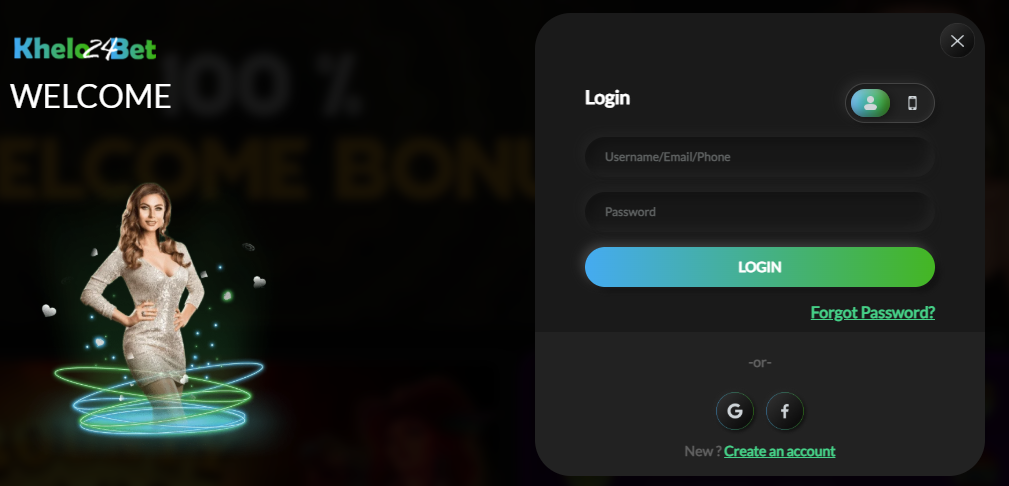
Use the Login button in the official site's header, not a pop-up or banner on another page. The window has a toggle for phone login.
Type your username, email or phone number in the first field, then your password, or use Google or Facebook if you signed up that way. Check that Caps Lock is off and that autofill has not inserted an old password.
If the site asks for a code or confirmation, finish it on the same screen. Never pass that code to anyone else.
Your balance and account menu should now be visible. If the site loops back to the login screen, see the problem table.
The account is the same however you sign in. What changes is where you enter your details and what can go wrong on each device.
| Device | How to sign in | Watch out for |
|---|---|---|
| Android app | Open the app and tap Login | An outdated app version. Reinstall from the official site; see the Android APK guide. |
| Android browser | Chrome on khelo24bet, then Login | Saved passwords from an older account or a copycat site. |
| iPhone / iPad | Safari on khelo24bet, then Login | The iOS app is described as coming soon; any "Khelo24Bet" app offered now is unverified. See iOS access. |
| Desktop | Any current browser on khelo24bet | Shared or public computers: log out and do not let the browser save the password. |
Tip: add the official address to your phone's home screen from the browser menu. It opens like an app and removes the need to search for the site each time. For a full comparison of mobile options, read the Khelo24Bet app overview.
Reset it rather than guessing. Many platforms lock an account for a period after several wrong attempts, which turns a small problem into a support ticket.
Contact Khelo24Bet support from the official site. Expect to prove the account is yours, usually with the same ID used for KYC verification. This is why registering with your real name matters.
Find the message or symptom you see, then work through the fix before contacting support.
| Problem | Likely cause | What to do |
|---|---|---|
| Password rejected | Typo, Caps Lock, or autofill entering an old password | Type the password manually once. If it still fails, reset it. |
| Account not found | A different username, email or phone was used at sign-up, or registration was not completed | Try the other contact detail, and look for the confirmation email. See registration steps. |
| Account locked or restricted | Repeated failed attempts or a security review | Stop trying, wait, then ask support. If verification is requested, complete KYC. |
| Code not arriving | Weak signal, Do Not Disturb, SMS filters or a wrong number | Check the number on file, wait for the resend timer, and check blocked or spam messages. |
| Site will not load or keeps reloading | Connection, browser cache or a blocked network | Switch between Wi-Fi and mobile data, clear the cache or try another browser. Do not use "mirror" links from strangers. |
| App login fails, browser works | Outdated or corrupted app | Uninstall and reinstall from the official site. See the APK guide. |
| Logged out repeatedly | Browser blocking cookies, or private mode | Allow cookies for the official domain and use a normal browser window. |
Still stuck? The Khelo24Bet support guide lists the contact channels and what to include so the issue is resolved in one conversation.
Most lost accounts are not hacked; the password is handed over through a fake page or a fake support chat.
khelo24bet.games is an information portal, not the operator. A login form here would mean handing your password to a third party. Any site that is not the official address and still asks for your Khelo24Bet password should be treated as a phishing attempt.
Jump straight to the task you came for. Each card opens a guide with the steps, the checks to make and the common problems.
Log in from the official address, khelo24bet, using the Login button on that site, or from the Android app downloaded from it. A separate direct login URL has not been verified, so avoid login links shared in messages or groups.
Yes. On Android you can use the advertised app or the mobile browser. On iPhone, the iOS app is described as coming soon, so log in through Safari or another browser on the official address.
Tap Forgot Password? under the Login button in the official login window and follow the instructions sent to the email or phone registered on the account. If you no longer have access to either, contact Khelo24Bet support, which may ask you to verify your identity first.
The usual causes are a mistyped or old saved password, signing in with a different email or phone than the one you registered, an unconfirmed email address, a temporary lock after repeated failed attempts, or an outdated app. Work through the problem table on this page, then contact support if none apply.
No. Type the official address yourself or use a bookmark. Links in messages and groups are a common way to send people to copycat pages that capture passwords. Genuine support never needs your password or a one-time code.